
L1/L5 GNSS RTK HAT
A professional-grade dual-band GNSS RTK HAT for Raspberry Pi based on the u-blox NEO-F9P module. It delivers centimeter-level positioning accuracy using RTK corrections and concurrent reception of up to four satellite constellations on L1 and L5 bands.
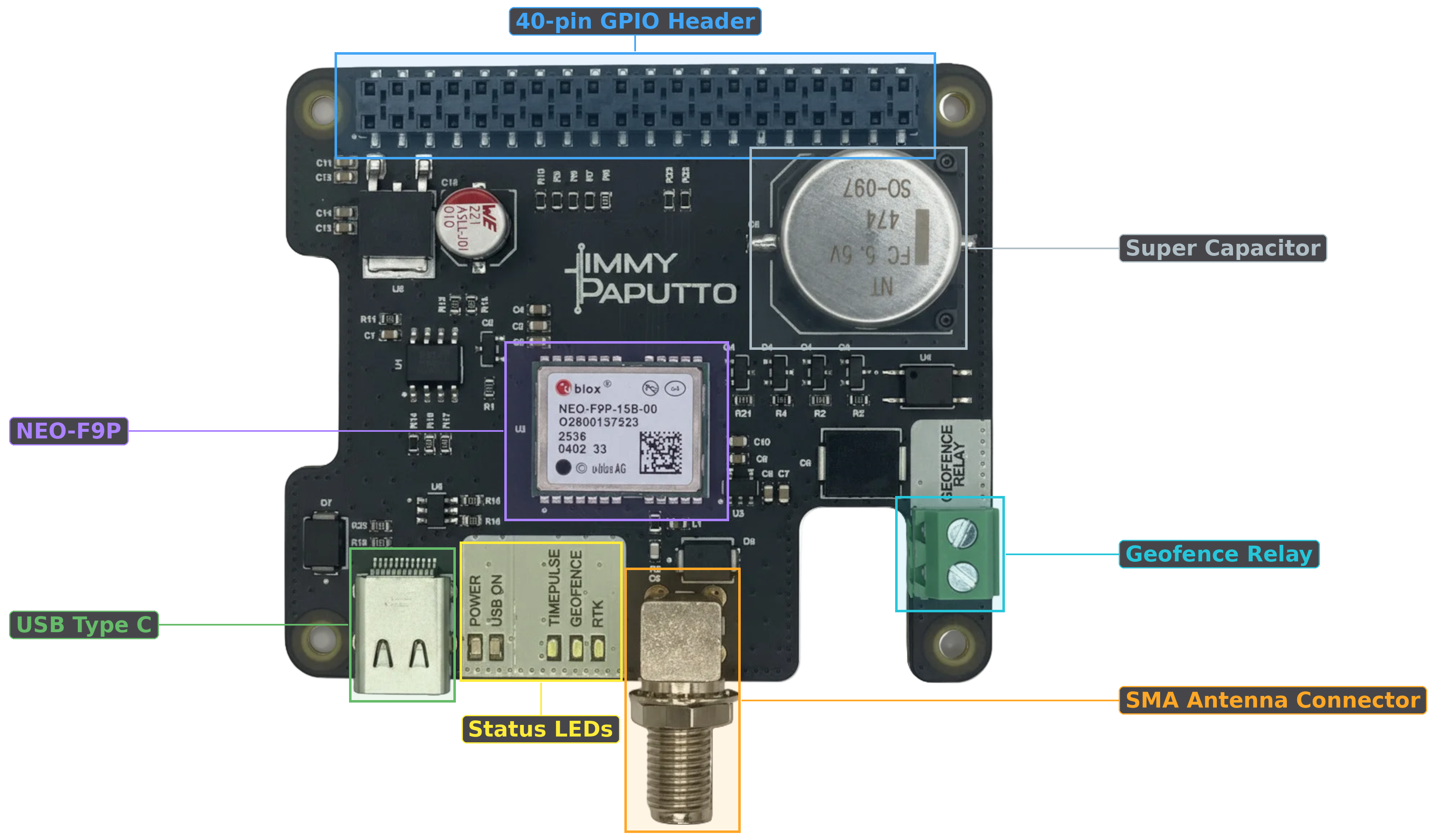
| GNSS Module | NEO-F9P |
| Frequency Bands | L1 + L5 |
| Constellations | GPS + QZSS, Galileo, GLONASS, BeiDou (4 concurrent) |
| Position Accuracy | ~0.01 m (RTK), ~2.5 m CEP (standalone) |
| Max Update Rate | 20 Hz |
| RTK | Base station (Survey-In / Fixed Position) & Rover |
| RTCM3 | Input (rover corrections) and output (base corrections) via UART |
| Geofencing | Up to 4 circular zones + PIO relay output |
| Hot Start | ~2 s TTFF via onboard supercapacitor backup |
| Timepulse (PPS) | Configurable pulse on GPIO 5 |
| Jamming / Spoofing Detection | Yes |
| Dimensions | Raspberry Pi HAT form factor |
Concurrent L1 + L5 reception provides significantly better multipath resistance than single-band receivers. With RTK corrections (via RTCM3), the module achieves centimeter-level accuracy. In standalone mode it delivers ~2.5 m CEP — already improved over single-band modules thanks to dual-band ionospheric error cancellation.
The board provides an SMA female connector for an external GNSS antenna.
- Active antenna supply: 3.3 V@30mA output on the antenna pin to power active antennas directly — no external bias-tee needed.
- Antenna supervision: The board monitors antenna status (OK, Short, Open) and power state. This is reported via the
rfBlocksfield in the navigation data. - For best results, use an active antenna with a clear sky view. A passive antenna will also work but may yield reduced sensitivity.
TipThe antenna status is available in therfBlocks[].antennaStatusfield returned by the library. Use it to detect antenna disconnection or short-circuit conditions.
The USB-C port provides direct serial access to the NEO-F9P module, bypassing the Raspberry Pi entirely. When connected via USB cable, the module appears as a CDC-ACM serial device (/dev/ttyACM0).
Use cases:
- u-center — connect from a PC to use u-blox’s configuration and evaluation tool for inspecting, configuring, and debugging the receiver
- Firmware updates — flash new firmware onto the NEO-F9P via USB
- Direct gpsd access — feed NMEA data to gpsd without the library’s SPI bridge
- Any serial terminal — any tool that accepts serial input can connect directly
NoteUSB access bypasses the library’s SPI communication. Do not use USB and the library simultaneously — they will conflict.
The onboard supercapacitor provides backup power to the module’s battery-backed domain (RTC, ephemeris, almanac, and last-known position) when the Raspberry Pi is powered off.
- Hot start retention: up to 4 hours after power loss
- Hot start TTFF: ~2 seconds (vs. 30–60 seconds for a cold start)
- How it works: The supercapacitor charges while the HAT is powered. On power loss, it sustains the backup domain so the receiver remembers satellite data and can reacquire a fix almost instantly when power returns.
NoteTo take advantage of hot start, usesoftResetUbloxSom_HotStart()instead ofhardResetUbloxSom_ColdStart()while doing a software reset. A cold start clears all stored satellite data regardless of supercapacitor state.
The board has several status LEDs located near the USB-C connector:
| LED | Color | Function |
|---|---|---|
| PWR | Green | Power indicator — lit when the HAT is receiving power from the Raspberry Pi |
| USB ON | Green | USB connection indicator — lit when the HAT is connected by USB cable |
| TIME PULSE | Ice Blue | Timepulse — blinks at 1 Hz (default) when the receiver has a valid GNSS fix |
| GEOFENCE | Ice Blue | Geofence status — driven by PIO pin 6, lights up based on geofence state, actual logic depends on configuration |
The TIME PULSE LED provides an immediate visual confirmation that the receiver has acquired a fix. If the PPS LED is not blinking, the receiver does not yet have a position solution.
The HAT connects to the Raspberry Pi via the standard 40-pin GPIO header. The RTK HAT uses both SPI and UART interfaces:
| GPIO Pin | Function | Description |
|---|---|---|
| GPIO 5 | Timepulse (PPS) | 1 PPS output from the NEO-F9P — usable as interrupt or PPS source for time servers |
| GPIO 17 | TxReady | SPI data-ready interrupt — signals when the receiver has data to transmit |
| SPI0 | Data bus | SPI communication with the NEO-F9P (CE0, MOSI, MISO, SCLK) — primary interface for UBX protocol |
| GPIO 14 (TXD) | UART TX | Raspberry Pi UART transmit — sends RTCM3 corrections to the rover |
| GPIO 15 (RXD) | UART RX | Raspberry Pi UART receive — reads RTCM3 output from the base station |
| EEPROM | Data bus | I²C communication with the HAT’s EEPROM (SDA, SCL) |
SPI is the primary interface — it carries all UBX protocol traffic (navigation, configuration, monitoring). UART is the secondary interface dedicated to RTCM3 corrections: the base station outputs RTCM3 messages on UART TX, and a rover receives corrections on UART RX.
NoteGPIO 5 Conflict — Kernel PPS (/dev/pps0) and the library’senableTimepulse()/timepulse()both use GPIO 5. They cannot run at the same time. Choose one or the other.
NoteUART must be enabled viaraspi-configbefore use. See Installation for details.
A screw terminal on the board edge provides a relay output. This output is driven by the module’s hardware geofencing engine.
Recommended operating conditions of the onboard relay:
- Maximum voltage on both pins ≤ 48 V
- Maximum current ≤ 325 mA
- Maximum resistance between the terminals in ON-state ~2 Ω