
Print Satellites
Display a per-satellite table showing constellation, signal strength, elevation, azimuth, and quality for all tracked satellites.
Source: examples/cpp/print-satellites/, examples/c/print-satellites/, examples/python/print_satellites.py
NoteWant a fancier dashboard? The C++ version also ships an advanced mode (print-satellites-advanced) — a rich terminal UI with ANSI colors, Unicode signal-strength bars, color-coded constellations, a per-constellation used/total summary, and ephemeris/almanac/DGPS correction counters, refreshed at 1 Hz. See the screenshot below. The rest of this page documents the basic example, which is what C, Python, and theprint-satellites-basicC++ build all use.
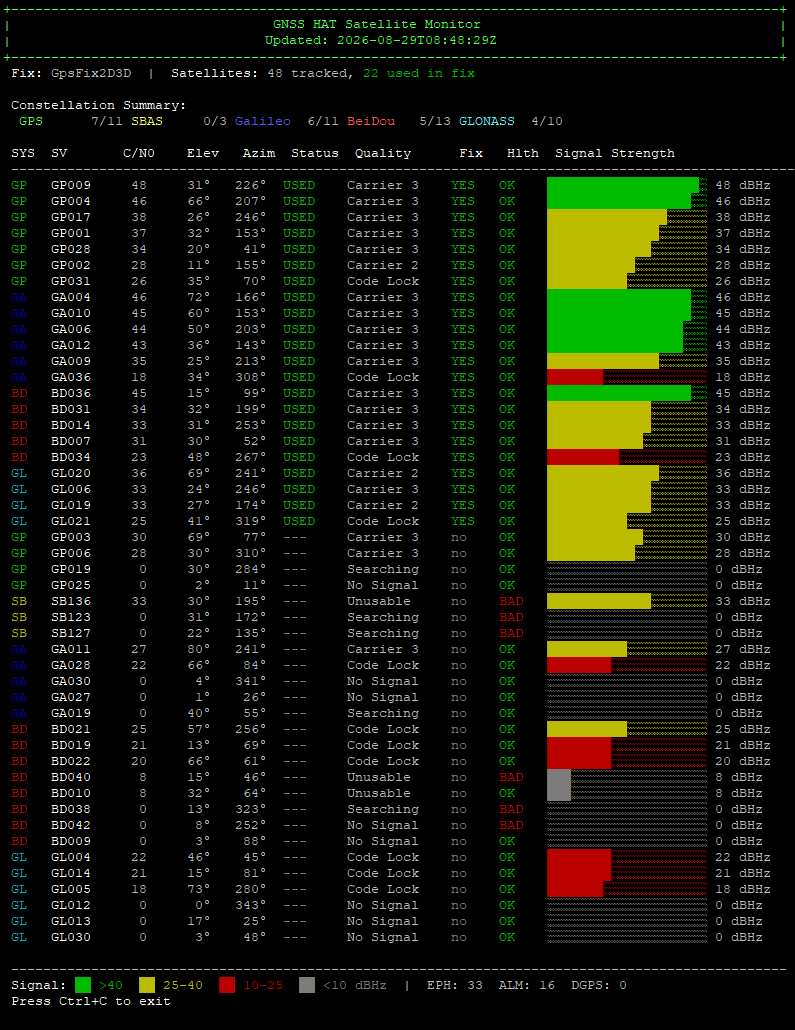
The basic example — shared by C, Python, and the print-satellites-basic C++ build — prints a tabular listing: GNSS system, SV ID, C/N0, elevation, azimuth, quality, used-in-fix, health, plus total/used satellite counts.
| Column | Description |
|---|---|
| Constellation | GPS, Galileo, GLONASS, BeiDou, SBAS, QZSS |
| SV ID | Satellite vehicle number |
| C/N0 | Carrier-to-noise ratio in dBHz (signal strength) |
| Elevation | Degrees above horizon (-90 to 90) |
| Azimuth | Compass direction (0–360°) |
| Quality | Signal quality level |
| Used | Whether the satellite contributes to the fix |
- C/N0 > 30 dBHz = good signal, usable for positioning
- C/N0 > 40 dBHz = strong signal
- Used in fix = satellite actively contributes to the navigation solution
sudo examples/bin/print-satellites-basic
sudo examples/bin/print-satellites-advanced
sudo build/examples/c/print-satellites/print-satellites
python3 examples/python/print_satellites.py