
Timepulse
The u-blox module outputs a configurable pulse signal on GPIO 5. This is typically used as a PPS (Pulse Per Second) signal for time synchronization. On supported HATs, the same signal also drives the LED, so changing the timepulse configuration may also affect the visible blink pattern.
| Field | C++ Type | Description |
|---|---|---|
active | bool | Enable or disable the timepulse output |
fixedPulse | Pulse | Pulse configuration when the receiver has a GNSS fix |
pulseWhenNoFix | optional<Pulse> | Optional separate pulse config when there is no fix. If omitted, no pulse is output without a fix |
polarity | ETimepulsePinPolarity | Which edge aligns with the top of the second |
| Field | C++ Type | Description |
|---|---|---|
frequency | uint32_t | Pulse frequency in Hz |
pulseWidth | float | Duty cycle as a fraction — 0.0 to 0.99 |
| Value | C++ | C | Python |
|---|---|---|---|
| Rising edge at top of second | RisingEdgeAtTopOfSecond | JP_GNSS_TIMEPULSE_POLARITY_RISING_EDGE | RISING_EDGE |
| Falling edge at top of second | FallingEdgeAtTopOfSecond | JP_GNSS_TIMEPULSE_POLARITY_FALLING_EDGE | FALLING_EDGE |
The waveform below starts with an annotated 1 Hz pulse at 10% duty cycle so you can see how polarity decides whether the rising or falling edge lands exactly on the top of the second. The lower examples show the same GPIO 5 output at 5 Hz / 10%, 10 Hz / 50%, and a fix-dependent transition where pulseWhenNoFix uses one waveform until the receiver has a fix and fixedPulse takes over.
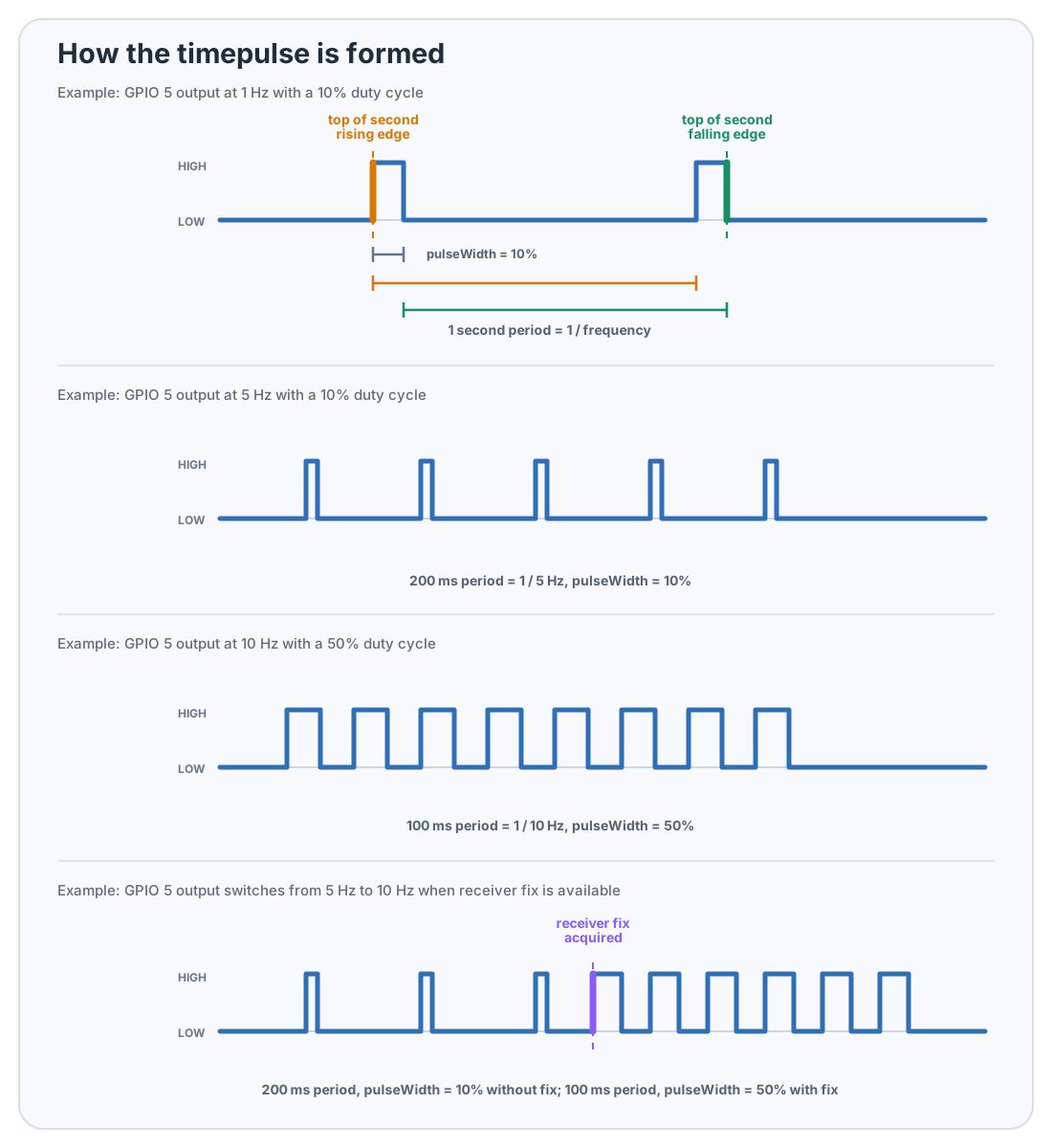
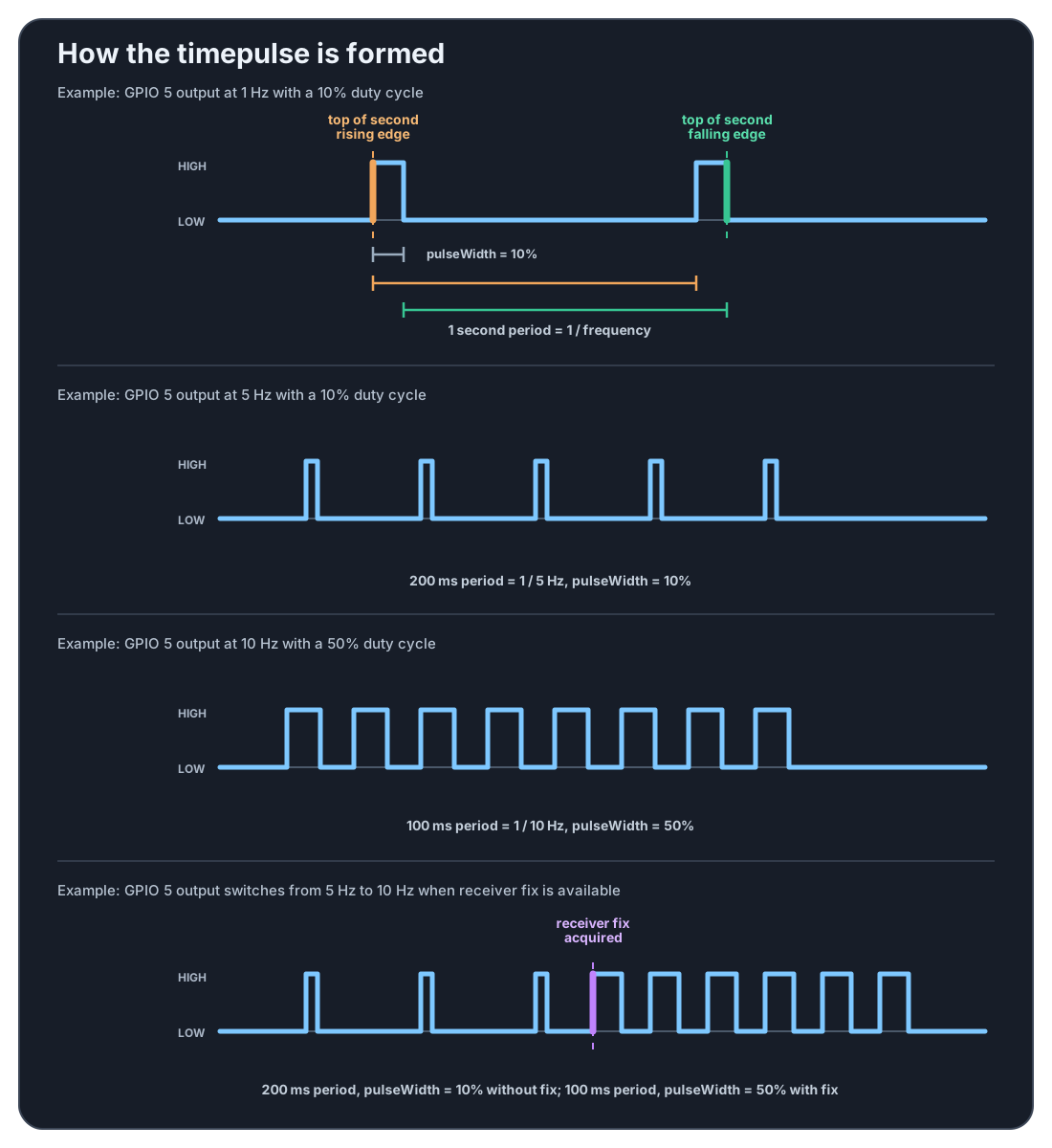
If the receiver has no fix, pulseWhenNoFix can emit a different waveform or disable the output entirely. A common pattern is a slower pulse / no pulse before fix and a different period or duty cycle once the receiver is locked.
config.timepulsePinConfig = TimepulsePinConfig {
    .active = true,
    .fixedPulse = { .frequency = 1, .pulseWidth = 0.1f },
    .pulseWhenNoFix = std::nullopt,
    .polarity = ETimepulsePinPolarity::RisingEdgeAtTopOfSecond
};
config.timepulse_pin_config.active = true;
config.timepulse_pin_config.fixed_pulse.frequency = 1;
config.timepulse_pin_config.fixed_pulse.pulse_width = 0.1f;
config.timepulse_pin_config.polarity = JP_GNSS_TIMEPULSE_POLARITY_RISING_EDGE;
config['timepulse_pin_config'] = {
    'active': True,
    'fixed_pulse': { 'frequency': 1, 'pulse_width': 0.1 },
    'pulse_when_no_fix': None,
    'polarity': gnsshat.TimepulsePolarity.RISING_EDGE
}
NoteKernel PPS Conflict — If you use the kernel PPS driver (dtoverlay=pps-gpio,gpiopin=5) for chrony/gpsd, do not callenableTimepulse()from the library — both use GPIO 5 and cannot coexist.